| 会员中心 | 设为首页 | 添加收藏 |
 |
| 当前位置:首页 > 供应信息 > 产品信息 > |
cypressCY8CKIT-002:CC-DEBUGGER仿真器 |
更新时间:2026-08-25 00:48:42 |

cypressCY8CKIT-002访问量:491 型号:PSOC Miniprog3 品牌:cypress CY8CKIT-002 PSoC MiniProg3 PSoC®是一款真正的可编程嵌入式系统级芯片,在单个芯片上集成了可配置的模拟和数字外设功能、存储器和微控制器。通过极其灵活的可视化嵌入式设计方法,包括经过预配置的用户定义外设和分层原理图输入,您可以随时改变主意并按期开展工作,而不需要从头开始重新启动项目,没有更多的目录,也没有其他限制。 PSoC®架构由可配置的模拟和数字模块、CPU子系统和可编程的布线和互连单元组成。PSoC使您可以接入来自PSoC功能库的经过预定义和测试的IP,或自行编写代码。无论采用哪种方式,您都可以灵活地构建具有创新特性和竞争优势的产品。 PSoC® MiniProg3编程和调试工具包集所有功能于一身,可作为PSoC 1、PSoC 3和PSoC 5架构的编程器,以及PSoC 3和PSoC 5架构的调试工具。该工具包包括一条10引脚的带状电缆,用于连接至针对PSoC 3和PSoC 5架构的标准10引脚JTAG插头接口,同时,器件本身则支持针对PSoC 1架构的5引脚ISSP编程插头。请注意,此工具包仅包含MiniProg3及配套电缆,其目的是为您提供额外的编程/调试能力,以满足您的需求。 The PSoC® MiniProg3 Program and Debug Kit is an all-in-one programmer for PSoC 1, PSoC 3 and PSoC 5 architectures, debug tool for PSoC 3 and PSoC 5 architectures, and a USB-I2C Bridge for debugging I2C serial connections and communicating to PSoC devices. The Miniprog3 supports the following protocols: • SWD • JTAG • ISSP • USB-I2C Included with the kit is a 10-pin ribbon cable for connecting to standard 10-pin JTAG header interfaces utilized for our PSoC 3 and PSoC 5 architectures while the device itself supports the 5-pin ISSP programming header for PSoC 1 architectures. The 5-pin connector also supports the USB-I2C Bridging capabilities and is a superset of the CY3240 capabilities. Please note, the CY8Ckit-002 only contains the Miniprog3 and supporting cables Important Usage Note: There is an electrical risk may be seen when customers reverse the 5 or 10 pin connector when trying to program or debug a system. By doing this power and ground connections will be connected to an electrically vulnerable configuration. This configuration may cause damage to the Miniprog3 resulting in failures. This often occurs when customers have a non keyed connectors or header for their system. The user must be aware of the polarity settings on the target board and/or use keyed connectors when trying to program using the Miniprog3. An update to the Miniprog3 will be available in late 2011 that will add ESD protections to the programmer. Kit Contents: • MiniProg3 • Program/Debug Ribbon Cable • USB Cable 联 系 人 :雷 俊 (先 生) 深圳博瑞图电子科技有限公司 TEL :0755-36675904 MOB :13823138950 FAX :0755-83244576 ADD :深圳市福田区福明路雷圳大厦西半层503室(上海宾馆对面) EMAIL :mrlei13823138950@163.COM 网 址:www.szprotools.com CC-DEBUGGER仿真器Lattice USB下载线 苏州乳胶管&输血胶管&吴江昆山太仓常熟橡Xilinx USB下载线 C8051F USB(JTAG U-EC6)型仿真器Freescale coldfire仿真器 |
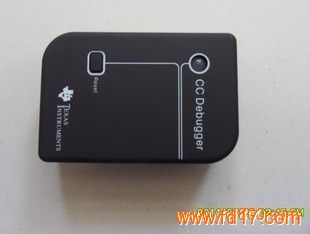
CC-DEBUGGER仿真器型号:CC-DEBUGGER 品牌:TI 1综述: CC-DEBUGGER 是一个主要是用于Texas Instruments低功耗的射频片上系统的在线小型编程和仿真 器。可以配合IAR 8051核 嵌入式平台软件进行调试和编程,也可以配合Texas Instruments的“Smart RF Studio”软件进行对无线模组的调试。 2兼容性问题 CC 调试器支持所有射频片上系统,全面支持CC2530、CC2531、CC2430、CC2431、CC2510、CC2511、CC2520、CC1101、CC1110、CC1111等系列 CC 调试器可以与 7.51A 或更高版本的 IAR EW8051 配合使用。 3 操作过程: 步骤1: 安装工具和驱动程序,已便于获得所需的驱动程序,对此也有必要下载和安装以下两个软件中的一个或者全部即SmartRF Studio 和SmartRF Flash Programmer。 步骤2 连接debugger 和目标板。 步骤3: 连接USB线。把USB线连接到Debugger上然后再连接电脑。 步骤4: 当调试器连接到电脑时,电脑会被认定为一个新的USB 设备Window系统会给这个设备安装一个驱动程序,当电脑出现提示后,选择自动搜寻驱动,就能完成安装。 步骤5: 检查LED状态指示灯, 当设备成功检测到目标板时 ,会显示为绿色;如果是红色表明目标板没有连接上。请确认是否连接错误或目标板没有供电。 步骤6: 开始使用工具,可以通过SmartRF Flash Programmer软件或者嵌入式系统平台来使用此设备。 深圳博瑞图电子科技有限公司 联 系 人 :雷 俊 (先 生) TEL :0755-36675904 MOB :13823138950 FAX :0755-83244576 ADD :深圳市福田区福明路雷圳大厦西半层503室(上海宾馆对面) EMAIL :mrlei13823138950@163.COM 网 址:www.szprotools.com |
 |
热门产品 |  |
 |





|